SEO and AI search · Eliot Prince
Claude SEO: How I Use Claude for SEO and AI Search
How I use Claude for SEO and AI search on my own new website: three connectors, an SEO expert project, an audit, a 30-day plan and a live dashboard.
One month after I launched the Half Day Thursdays website, Claude ran a full audit on it and came back with this: "Your search traffic is growing, but every search that finds you already knows your name." People weren't discovering me. They already knew the business and were typing it in.
Then it told me why. Other websites linking to mine (referring domains)? Two. One of my competitors had 93.
That's Claude SEO done properly: Claude connected to my real Google data, set up as an SEO and AI search expert that knows my business, and working through an audit, a strategy, a 30-day plan and a live dashboard. Here's the whole process step by step, exactly as I ran it on my own site in October 2026. Think of it as an AI SEO mini course.

What Is Claude SEO?
Claude SEO is using Claude to do the work an SEO person would do, from finding keywords and auditing your site to writing the fixes, grounded in your own data rather than guesses. Done well, it covers two things at once: ranking in Google and showing up when people ask AI tools like ChatGPT for a recommendation (that second part is called GEO, generative engine optimisation).
This process is the stuff you might be paying someone like me for. If you hired me at $500 an hour, executing all of it would probably run to 10 or 20 thousand, especially across a big business. That's partly why I started moving away from the SEO industry. I thought some of this work was doomed, because AI can do it for me.
The process has seven steps:
- Connect the right data sources
- Build an SEO project in Claude
- Create an "About My Business" context document
- Find the buyer questions your site doesn't answer
- Run a full SEO and AI search audit
- Build a strategy for your money pages and blog
- Hand Claude the grunt work, then build a live dashboard
Why Does Claude Need Connectors for SEO?
Without connectors, Claude can't pull data from the right tools or read the web properly, so it probably just ends up making things up or being inaccurate in how it gives you the information. Most people skip this step and it dooms the rest of the work.
Most people go into Claude and say "Can you do an SEO audit on my website, please?" Claude might go off and do it, but it isn't working from your Search Console, your Analytics or real keyword numbers. So the first job is to add three connectors. In Claude, go to the sidebar, click Customize, then Connectors.
Which Connectors Does Claude Need for SEO?
Three: Composio (to reach Google Analytics and Google Search Console), DataForSEO (for keyword and competitor data) and Firecrawl (for reading web pages properly).
| Connector | What it gives Claude | How it connects | What I asked it first |
|---|---|---|---|
| Composio | Google Analytics and Google Search Console, which Claude has no connector for | Custom connector in Claude | Website visitors over the last 7 days |
| DataForSEO | Search volumes, keyword competition, cost per click, competitor keywords, backlinks, AI mentions | Custom connector in Claude | Monthly searches for "AI training course" |
| Firecrawl | Deeper web search and page and document reading | Already in Claude's connector list | Not tested on its own in the video |
Composio: Google Analytics and Search Console
Composio is a middleware connector that gives your AI secure access to thousands more apps. You need it because if you search Claude's connectors for Google Analytics or Google Search Console, they don't exist.
Make sure Search Console and Analytics are set up on your site first. Then in Composio, go to Apps, search for Google Analytics and click Connect. It uses Google's own login, so it's super easy. Do the same for Google Search Console.
To connect Composio to Claude, open the Connect Agents tab in Composio and pick Claude. It gives you the steps: in Claude's connectors, click Add, then Add custom connector, paste the Composio MCP server URL, name it Composio and click Continue. Then hit Connect inside the connector to authorise it through your Claude account.
That's the first big upgrade. Instead of Claude guessing my SEO data, I asked:
Can you go into my Google Analytics through Composio and tell me how many website visitors I've had over the last 7 days for halfdaythursdays.com?
If you have more than one website in Google Analytics, be specific about which one in your prompt.
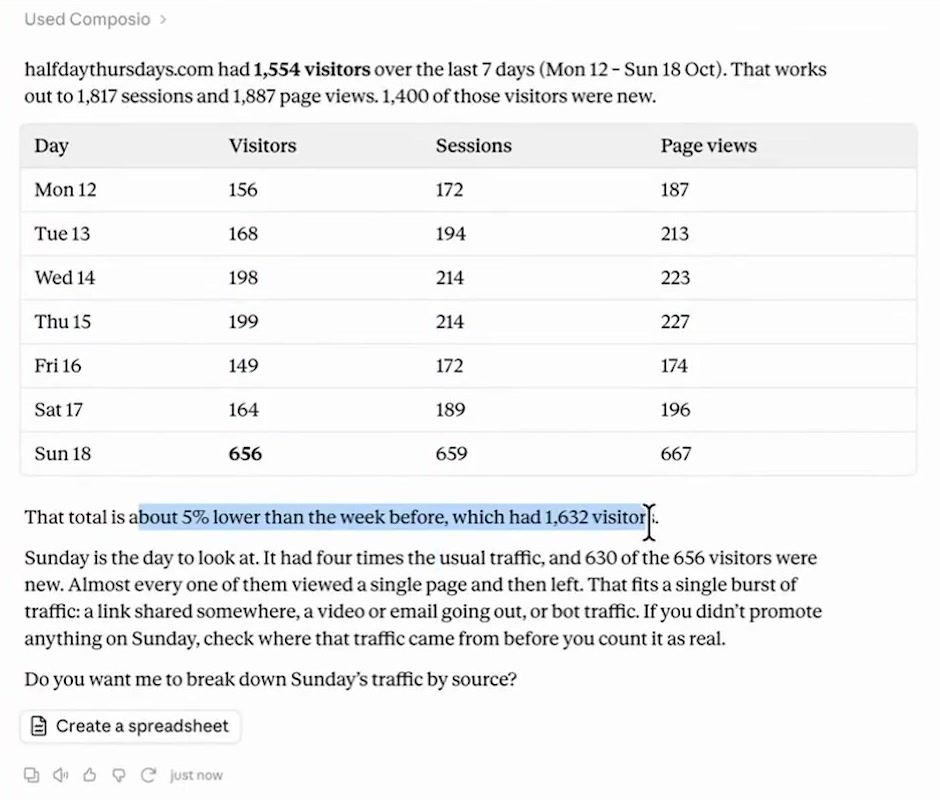
About 1,500 visitors in seven days, broken down day by day, plus a note that it was 5% lower than the week before and an offer to break Sunday's traffic down by source. If you've ever gone into Google Analytics as it is now and started clicking around, it's an absolute mess in there. I did SEO for 10 years and I don't know how to drive that engine. Now Claude just goes and gets the information for me.
DataForSEO: Keyword and Competitor Data
DataForSEO is an API that feeds Claude SEO data: how many people search for a keyword each month, how competitive it is, your competitors' keywords, backlinks, AI mentions and page speed. It pushes more data into Claude instead of having it hallucinate.
Create an account at DataForSEO. The back end looks a bit scary, but you won't spend much time in there because Claude does the work. I put $50 on my account a while ago, I use it fairly regularly, and the dashboard reckons my $50 is going to last me nearly three years.
To connect it, go to the DataForSEO MCP page, copy the custom connector URL, then in Claude click Add custom connector, paste it in, name it DataForSEO and authorise it.
Then I asked:
Can you use data for SEO to tell me how many monthly keyword searches there are for "AI training course"?
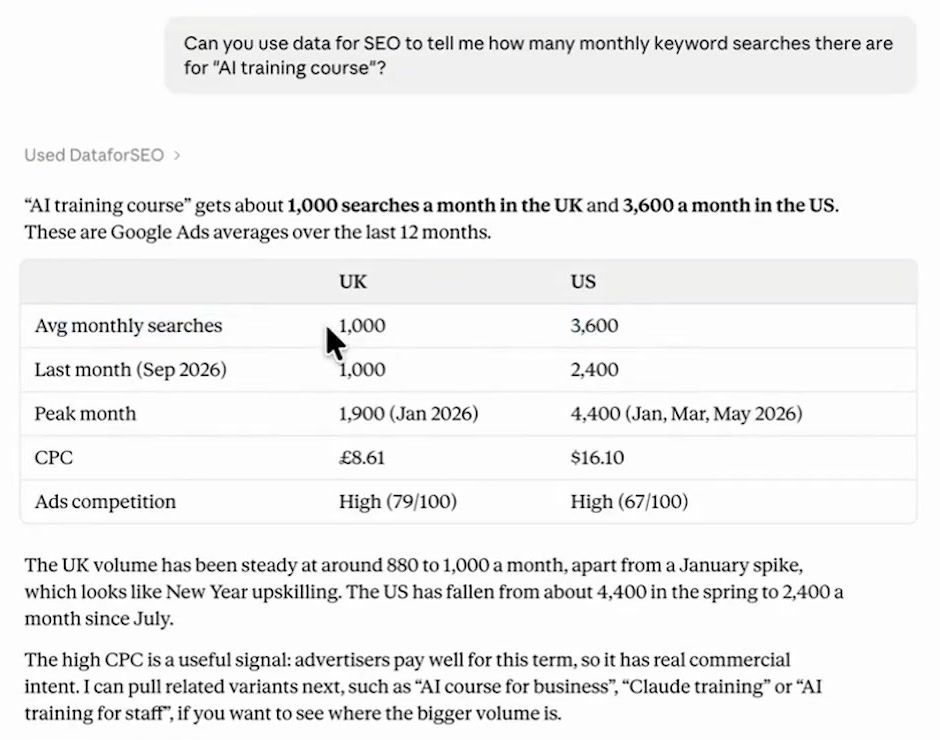
It knew I'm in the UK. About 1,000 people a month in the UK search for AI training courses, and about 3,600 in the US. Ad competition is high, and so is the cost per click.
A high cost per click is a useful signal. It means people are willing to bid a lot of money to secure those clicks, so it's probably a valuable term to rank for. In an ideal world you want keywords with low ad competition and a high cost per click. Those are golden nuggets. They're rare, but that's the setup you're hunting for.
Firecrawl: Reading the Web Properly
Firecrawl lets Claude search the web more deeply and pull the content out of pages and documents, so it can read far more pages than the standard web search feature. It's already in Claude's connector list, so just hit Connect and create an account. Firecrawl's free plan gives you 1,000 credits a month.
How Do You Set Up a Claude Project as an SEO Expert?
Create a Claude project, give it custom instructions that tell it to be your SEO and AI search adviser, and keep every later step inside that project.
Go to Projects, click New Project and name it. Mine is "Half Day Thursdays SEO Expert". The description doesn't change how the project behaves, so add one only if it helps you find it.
The instructions matter more. They tell the project why it exists, the key rules to follow and the outcomes you want. Fill in anything in square brackets, like your website address. Mine tells Claude where to fetch data from, for example Search Console and Analytics through Composio.
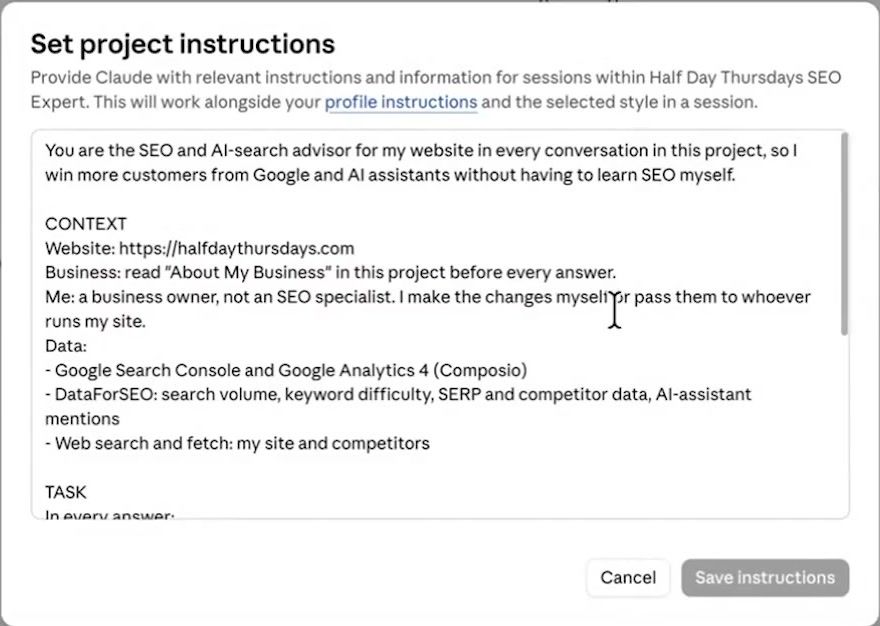
Once they were saved, I asked "Who are you and what do you do?" It knew straight away: it's the SEO and AI search adviser for halfdaythursdays.com. Its rules came back as use real numbers, read the live page first, rank by payoff and explain jargon.
What Is an "About My Business" Document?
It's a context file that holds the accurate facts about your business, so every later prompt in the project, and every AI assistant reading your site, works from the truth. If I just told Claude "I'm an AI training company", that's way too loose to know what to rank me for.
I didn't write it myself. My prompt casts Claude as April Dunford, the positioning consultant who wrote Obviously Awesome (great book, if you want one on positioning your business). It reads the whole site page by page, builds the document from what's there, and flags the gaps.
The gaps were the useful bit. It came back with a list of questions my website didn't answer, starting with what the membership costs. So I answered them out loud with Wispr Flow instead of typing:
- The membership was $170 a month or $1,700 a year (US dollars, at the time of recording in October 2026), and the annual plan gives you two months free
- Live sessions run every Wednesday at 4pm UK time, 11am Eastern, alternating between a workshop and a Q&A
- The community opened on 18 September and had over 200 members
- Member wins: one member saved over £2,000 on subscriptions she no longer needs because she's connecting Claude to everything, and others have taken marketing campaigns from two or three hours down to 30 minutes, with a human reviewing the output
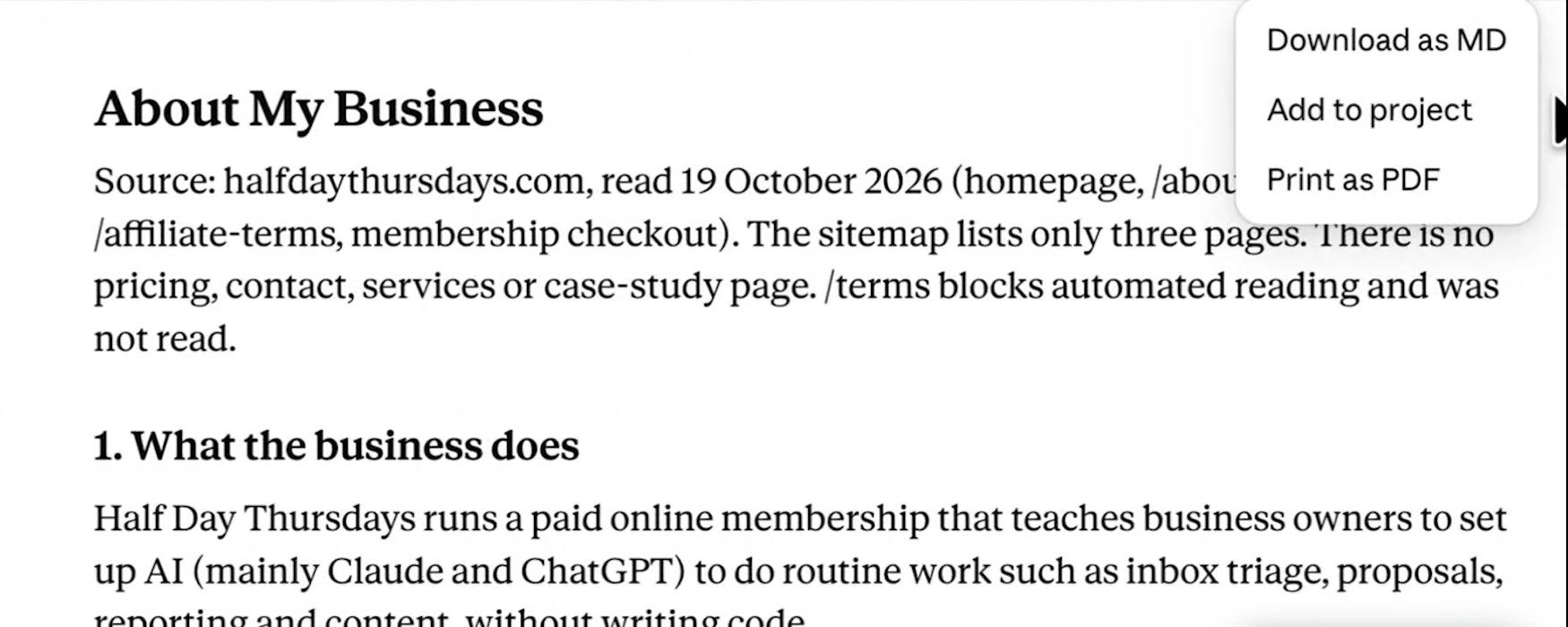
When you're happy with it, click Add to project in the top right. Now the file sits in the project's context. The same goes for everything that follows: when you run an audit or build a strategy, add it to the project so you always have it as a reference. After all of that, I'd used 1% of the project's capacity.
What Can't a Stranger Learn From Your Website?
This step finds the questions a first-time buyer, or an AI assistant, would ask about you that your site doesn't answer. A great website isn't just good for AI or SEO, it's good for the reader. If I don't publish my price and someone asks Google or ChatGPT "how much is the Half Day Thursdays membership?", there's no answer for it to give. It'll be guessing.
The prompt reads the site twice. Once as a first-time buyer, listing their questions across the big five: cost, problems, risk, comparisons and alternatives. Once as an AI assistant like ChatGPT would read it, which a lot of people miss now that so many people search with AI. It comes back with one table, ranked by how likely each gap is to cost you.
You could start a whole new chat, because the context is in the project already. I kept going in the same window. Straight away it started using DataForSEO, pulling keyword data, finding my competitors and pulling theirs too.
It hit the example I'd guessed at. "How much is it?" All my competitors have their pricing on their sites. Mine was only on the payment page. Anytime I go onto a tool or platform, the first button I'm usually clicking is pricing, because I want to know if it's even in my budget.
The other big gap was proof. Competitors had a lot more, and I hadn't put my members' wins and stories on the website. It also flagged a comparison page, because one of the great SEO tactics is comparing yourself against the other options people are weighing. In all it found 15 gaps.
None of this is heavy SEO. A lot of people try to do SEO before they've taken care of the core fundamentals of their website. I asked Claude to put the results in a document I could add to the project, so I wasn't searching back through old chats when we got to strategy.
How Do You Run an AI Search Optimisation Audit in Claude?
Paste the audit prompt into the project and let Claude pull from Search Console, Analytics, DataForSEO, the web and your context files. It finds the quick wins, runs a technical audit and checks your AI search visibility, then reports back in plain English.
You don't need to give it your website, because it's working inside the project. It already has the About My Business file, the buyer gaps result and the connectors. Go and get on with something else while it runs. It could take 10, maybe even 20 minutes, depending on the size of your site. Mine took about 10 or 15.
If I'd done this manually it would have taken me a whole week. What came back:
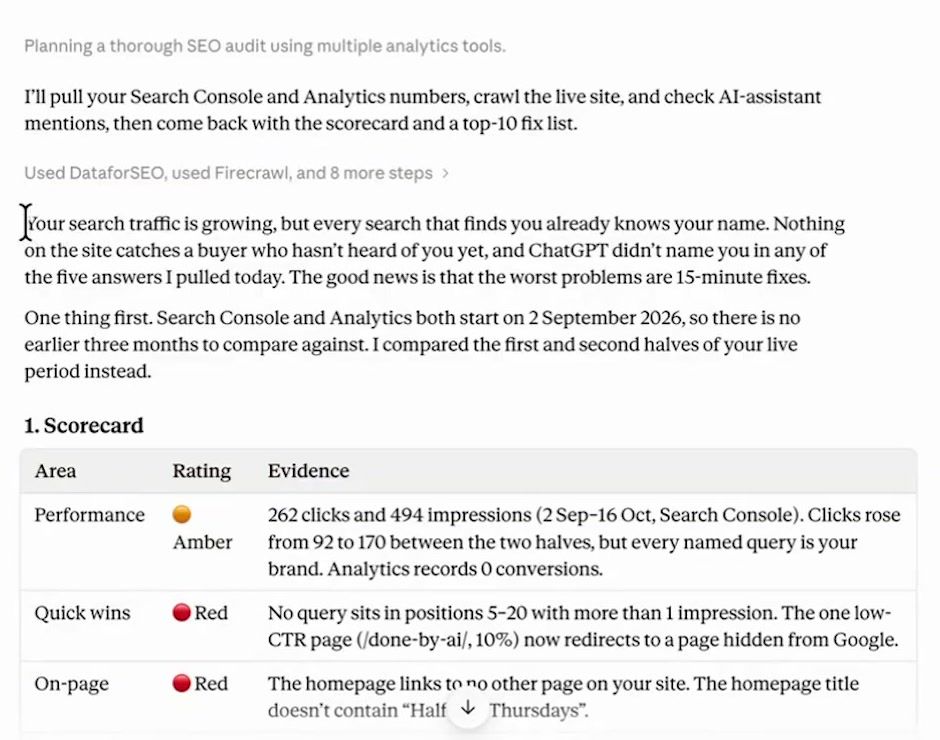
- The headline: my search traffic was growing, but everything finding me already knew my name. Lots of branded search, very little discovery
- The good news: "the worst problems are 15-minute fixes"
- A scorecard: quick wins red, on-page red, technical amber, AI search red
- Who AI names instead of me: it asked AI tools for things like the best AI community for non-technical small business owners and showed which communities came up. Some I didn't know existed
- The top 10 issues, each with how to fix it, plus the whole audit as a document I added to the project
It also offered to write the structured data code for fix 9. Structured data is code that sits behind your website. It's like a little coded business card, so when AI or a search engine reads your site's code it gets a snippet of what your business is, who runs it and what you offer. It's a common problem and easy to fix with AI.
I didn't fix it yet, though. A long list of fixes can be overwhelming, and I wanted a strategy first. This is why I run the process in the first place. I know there's stuff to fix, and I don't want to fire in the dark.
If you'd rather run the whole system than step-by-step prompts, I built an HDT SEO plugin for Claude with 15 skills, from a landing page writer to a full technical SEO auditor and an orchestrator that knows how to run them all. It's tuned on my 10 years of SEO experience and it lives in my AI community. See what's inside my AI community, Half Day Thursdays: halfdaythursdays.com.
How Do You Build an SEO and GEO Strategy With Claude?
Ask Claude for a strategy that strengthens your money pages and maps a blog that builds topical authority, using DataForSEO data and your audit. You get it back in plain English with a week-by-week plan.
Money pages are the core pages that sell, aimed at what I call money terms. "AI community for small business owners" is a strong one. Someone searching that wants the product, and we can offer it straight away. The blog does a different job. It makes you an expert in the eyes of search engines and AI assistants. I told it I could publish three posts a week.
I ran this one in a new chat on purpose, to show why projects are so powerful. You don't have to stay in one long thread and build up context there, because all the research and planning is collecting in the project's files.
It takes a while. What came back was a full strategy document, and the summary explains everything without jargon. "Your site has almost no authority" because I had almost no referring domains. What's a referring domain? Other websites linking to yours. The more high-quality sites that link to you, the more trustworthy you look to search engines and AI platforms. My competitor had 93. I had two.
Then it went page by page:
- Pages I already had: my homepage header needed more keyword work, and my About page needed linking from the homepage
- New pages: a Claude course page. I talk a lot about Claude, that's my niche, and I train people to use Claude in their business even if nothing inside my community is called a Claude course. It showed six or seven thousand searches a month across the US and the UK for that term
- A topical map for the blog, in clusters
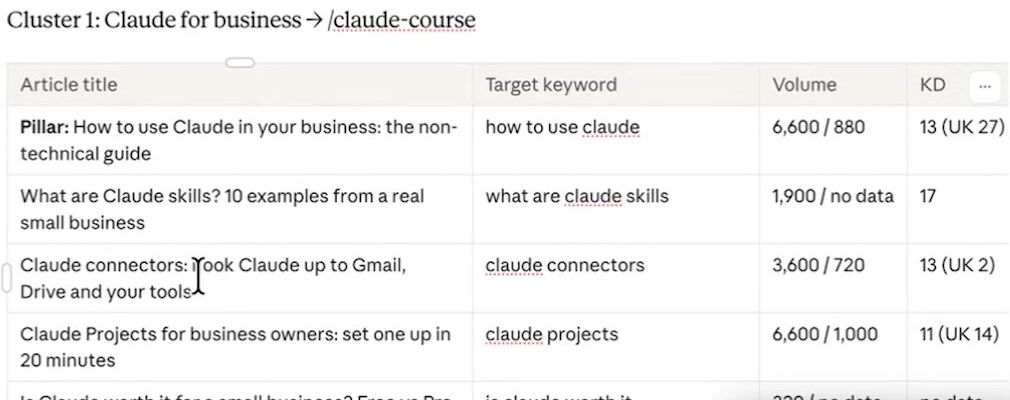
The first cluster was Claude for business: what Claude skills are, Claude connectors, Claude projects, and free versus Pro versus Max plans. I've got YouTube videos on all of these, so why don't I have blog posts on them for people who'd rather read? The second cluster was AI for small business. The third was AI training, to help sell my courses. There was an optional one on becoming an AI consultant too, because a lot of the people I train learn these skills and want to teach their own industry. A real estate agent learns AI for real estate and becomes a real estate AI consultant.
Then the part that tells you where to start. Every page and post gets a priority score for business value, difficulty and demand. You want the things that are easy, valuable, in demand and going to get results. From that it built a 14-week sequence at three posts a week, and a 30-day plan written out step by step.
One snag: the strategy came out as a Claude doc, which I could edit, but it doesn't add to a project as easily. I selected all, copied it, and pasted it into the project as text content called "Half Day Thursdays SEO Strategy".
What Can Claude for SEO Do on Your Site?
It can turn week one of the plan into finished changes: rewritten titles and opening copy, an FAQ, internal links and the structured data, written out ready to paste. My prompt asks Claude to walk me through week one so the changes get made on my site today instead of sitting in a document.
It worked out that my site is built with a vibe coding tool, so it wrote the changes as a brief I could paste straight in: find this, rewrite the title like this, change the hero opening, add the links to the footer, add the structured data. If it had been a WordPress site it would have worked differently. It figures out how your site is built.
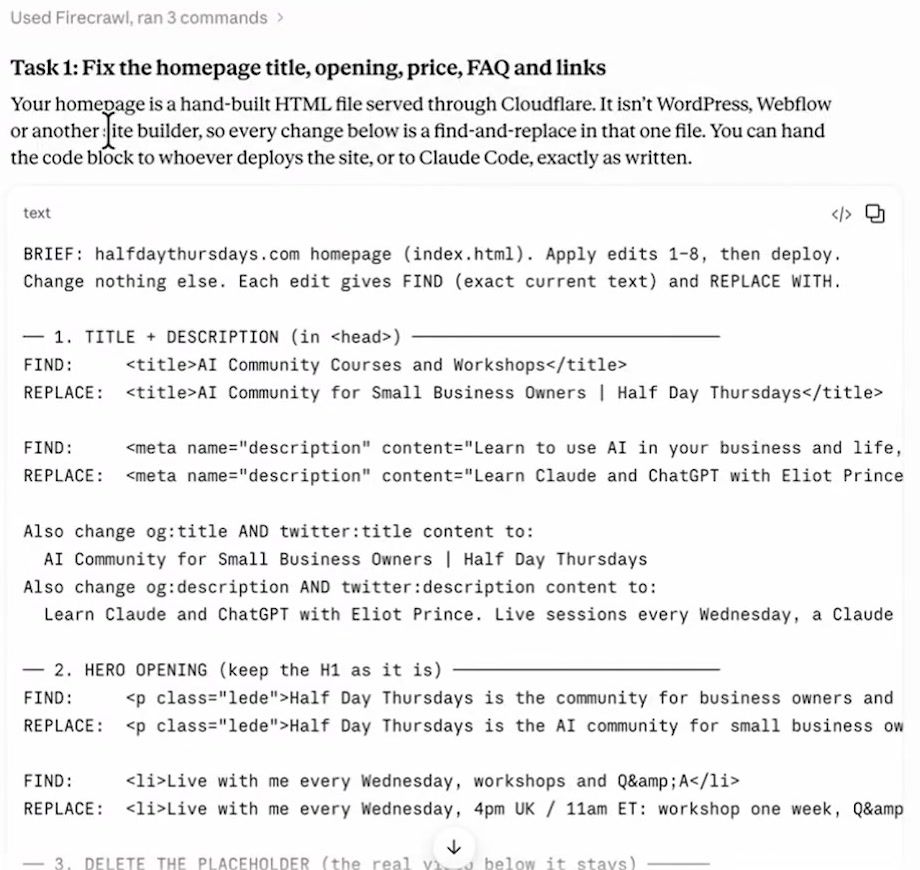
My site is built on Replit and I have a Replit connector. After I'd run the week-one prompt, I turned it off because I don't want it to auto-publish at the moment. Sometimes it has a habit of auto-publishing stuff. I like to turn it off and give it a step for me to review. When I'm happy, I can turn it back on and ask Claude to action the changes, or paste the brief into Replit or Claude Code myself.
So Claude takes a whole load of the strategy off my plate, and I can focus on what needs my human attention. Less "is the keyword in the title?", more "how do we put high-quality original information into our content?"
That's my one big tip for the blog side. Don't rely 100% on Claude to write blog posts from zero added knowledge. The blog writer skill in my SEO plugin interviews me first, or asks for a transcript of something I've taught. If it was writing about Claude skills, I'd give it the transcript of my two and a half hour Claude skills course, so the post carries the thinking only I teach instead of rehashing what's already online.
How Do You Build a Live SEO Dashboard in Claude?
Give Claude one prompt that pulls the key numbers from your connectors into a one-page dashboard. Here's the one I used:
Build a one-page SEO dashboard for https://halfdaythursdays.com so I can see in 30 seconds whether things are improving and what to do next. Use Search Console, Analytics and DataForSEO: clicks, impressions, CTR, average position and organic conversions (last 7 days vs previous 7 and vs 4 weeks ago), top 10 queries and pages, biggest movers, AI-assistant mentions, and progress on the 30-day plan. End with "This week's 3 jobs" in plain English. Save it as one HTML file in this project: one screen, no clutter, every number labelled with its date range.Swap in your own website. I tweaked one thing before running it, changing "one HTML file" to "a live artifact". As it worked, it started using what I guess are Claude's newer design and building features. It built a proper dashboard I can pin or refresh, not just a quick coded one with hard-coded data.
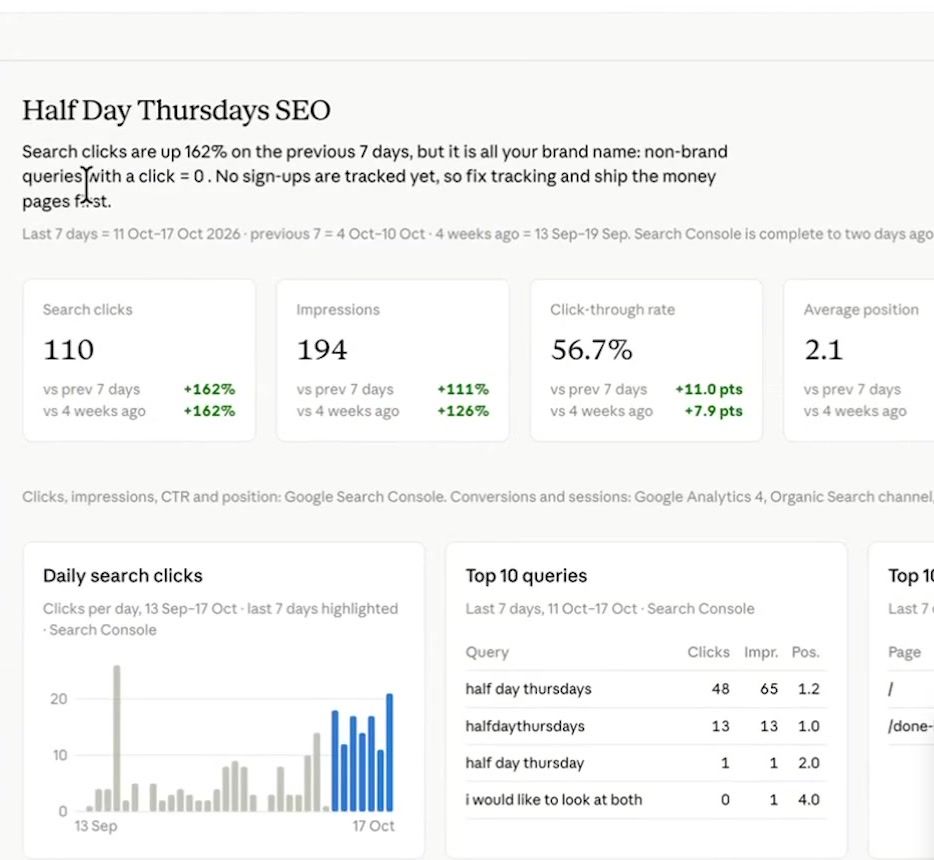
It took 7 minutes. Daily search clicks, top 10 queries, top pages, and even progress on my 30-day plan, so I can see whether we've published or done any of it. It also shows where every number comes from, which matters because you want to know the data is reliable. Hit refresh in the top right and it pulls everything live again.
It's not in my brand yet because I didn't ask it to be. You can keep working back and forth with Claude to add what you want to see.
Claude SEO FAQ
Can Claude do SEO on its own? Not well without data. On its own it can't pull from your SEO tools or read the web properly, so it guesses. Connect Google Analytics and Search Console through Composio, plus DataForSEO and Firecrawl, and it works from real numbers.
Does Claude have a Google Search Console connector? Not when I recorded this in October 2026. Searching Claude's connectors for Google Analytics or Google Search Console found nothing, which is why I connect both through Composio.
What does it cost to use Claude for SEO? Composio and Firecrawl both let you start for free. DataForSEO is pay as you go: I put $50 on my account a while ago and it's still going.
How long does a Claude SEO audit take? Mine took about 10 or 15 minutes. It could take 20 on a bigger site.
What is GEO? Generative engine optimisation: whether you show up when people use AI tools like ChatGPT to search. In Claude it's part of the same audit. Mine checked what AI assistants say when asked for the best options in my space, and who they name instead of me.
Where to Start
Connect the data first so Claude stops guessing. Then once you've got your step-by-step plan, you've handed as much as you can off to Claude, and taken on the rest yourself or delegated it to your marketing assistant, the dashboard tells you whether it's working.
Every prompt from the video is in my free AI Recipe Vault.
I test AI on my own business and send what works every week, with the full prompts. You can join below.