Field notes · Eliot Prince
Best Custom GPT Alternative: 3 Options Before December 11
Custom GPTs switch off on 11 December 2026. I set out to solve this six weeks ago and tested every option I could find. Here are the three worth your time.
Custom GPTs are going extinct. OpenAI is switching them off on 11 December 2026, on every ChatGPT plan. If you do nothing, they disappear overnight. Poof. Gonzo, done.
My EP Chat (AI Eliot) ran on a custom GPT, so people could ask me questions at 2am while I slept. I set out to solve this 6 weeks ago. I've tested every solution I could find, and I clicked the migrate button myself so you know exactly what's coming. Here are the three options worth your time, and the one I'd pick.
What Happens to Custom GPTs on 11 December?
They stop working. On 11 December 2026 custom GPTs and their GPT pages become inaccessible, on every standard ChatGPT plan. Your old conversations stay in your chat history. FedRAMP workspaces and some Enterprise workspaces with an approved deferral get until 11 February 2027. It's all in OpenAI's custom GPT retirement and migration FAQ.
This is a nightmare for so many businesses. Custom GPTs were one of the first, best things AI ever gave us, and I think OpenAI has missed the point of what made them special.
AI is overwhelming and hard. Custom GPTs were elegant and simple. Load them with knowledge, add some instructions and rules, then send someone a link. Your team didn't need to know how to use AI. Neither did your customers. Coaches and consultants use them to deliver tailored intelligence to their clients. Traditional businesses use them to deliver internal knowledge and support to their teams.
Why Not Just Vibe Code Your Own?
Sure, you can. Build it in Replit, Claude Code your own version, or whatever flavour of vibe coding you prefer.
But a custom build needs an API plugged in to power it, ChatGPT or Claude under the hood. And when someone logs in and uses it, you pay the bill. That's manageable, but with people using it a lot, it might become unaffordable and you can end up with runaway costs.
Half Day Thursdays members spend hours chatting with EP Chat. I don't fancy paying for runaway token costs. So each option below is an answer to one question: who pays for the chat, and how do you keep that under control?
The Three Options Compared
| Option | Best for | Who pays for the chat |
|---|---|---|
| ChatGPT plugin | You, or a team in one ChatGPT business workspace | Each person's ChatGPT plan |
| Chat Thing | Customers, website visitors, a team on Slack or WhatsApp | You, at a flat monthly price |
| Your own connector | Members or clients who use Claude | Each person's Claude plan |
Option 1: Migrate Your Custom GPT to a ChatGPT Plugin
This is what OpenAI wants you to do. Log into ChatGPT on the web (I believe that when I recorded this, you had to get to your GPTs through the web app. You probably won't see them in the desktop app.). Go to Explore, then GPTs, and you'll see the banner: migrate your GPTs to plugins by December 11.
I suggest you don't hit the migrate-everything button. Do them one by one, especially the ones your business runs on.
When you migrate, your instructions become a skill and your knowledge files become its reference files, just like you'd build a Claude skill. Custom actions and the model you picked don't come across, and the original GPT can no longer be edited.
It took me a couple of minutes and it worked smoothly. BUT it doesn't have the same feel and usability as a custom GPT.
Can You Share a Migrated Plugin?
This is where it gets messy.
- Personal account: you can't share it publicly or with anyone else. You can download the plugin file and send it to someone, but then they can read all your instructions, which gives away your IP.
- Business account: you can share it by link or in your workspace's directory, but only with people inside your organisation.
- Public: you submit it to the plugin directory for approval. You jump through hoops like publishing to an app store. Only then do you get a publicly shareable link.
You can also try to lock it to paying members, with a login that checks their membership. I started down that road with ChatGPT walking me through connecting it to Circle, where my community runs. It's taking quite a while and it's very complicated to set up, compared with a custom GPT where you just give someone a link.
And at the end, people still have to install it and work out how to run it, rather than open a web page and start chatting. Plus, you're still locked into ChatGPT.
Pros: official, quick to migrate, your instructions and files come across.
Cons: no simple share link, sharing the file exposes your IP, and it locks everyone into ChatGPT.
Best for: internal team GPTs on a ChatGPT business account.
Personally, it's not something I'm going to be doing.
Option 2: Chat Thing (My Pick)
Chat Thing is a chatbot you own. You're not tied to ChatGPT. In some places it brands itself as the custom GPT alternative your customers can still reach. I find it a nice balance between simplicity and technical depth.
Setting up a bot feels just like setting up a custom GPT. I copied over my EP Chat welcome message, example questions and instructions, uploaded my knowledge files, hit synchronise, and it was answering like me in minutes.
Then you can share it with a link. No sign-in needed. Just like a custom GPT!!
And it goes way further:
- Embed it on your website (I dropped it onto a test homepage in Replit in two minutes)
- Plug it into WhatsApp, Slack, Discord, email, even phone
- Turn on its MCP server and use it as a connector inside Claude or ChatGPT. When I was talking to the team building it, I said this would be a neat way to do it, and they added it for us
- Pick the AI model under the hood (GPT, Claude, Gemini, cheap or premium)
How Much Does Chat Thing Cost?
Best bit... no API to plug in. Each plan gives you a set amount of tokens a month for a flat price, so you know what the bill is. You can try it on a free plan with one bot. Basic is $14 a month, or $11.67 a month billed yearly. Choosing your own model and all the channels start on Standard, at $49 a month. Those prices are from Chat Thing's pricing page on 13 November 2026.
I'm a HUGE fan of Chat Thing, and I'm not paid or sponsored to say this. I do have an affiliate link, and the promo code ELIOTTHING gives you 20% off your first 3 months.
Pros: link-and-go is back, flat pricing, any model, deploys anywhere.
Cons: another subscription, and your bot is built on someone else's platform.
Best for: almost everyone. Customer-facing bots, internal knowledge bots, lead capture.
I'm probably going to use Chat Thing on my homepage, to help guide people with any questions they have about Half Day Thursdays.
Option 3: Claude Code Your Own AI Brain Connector
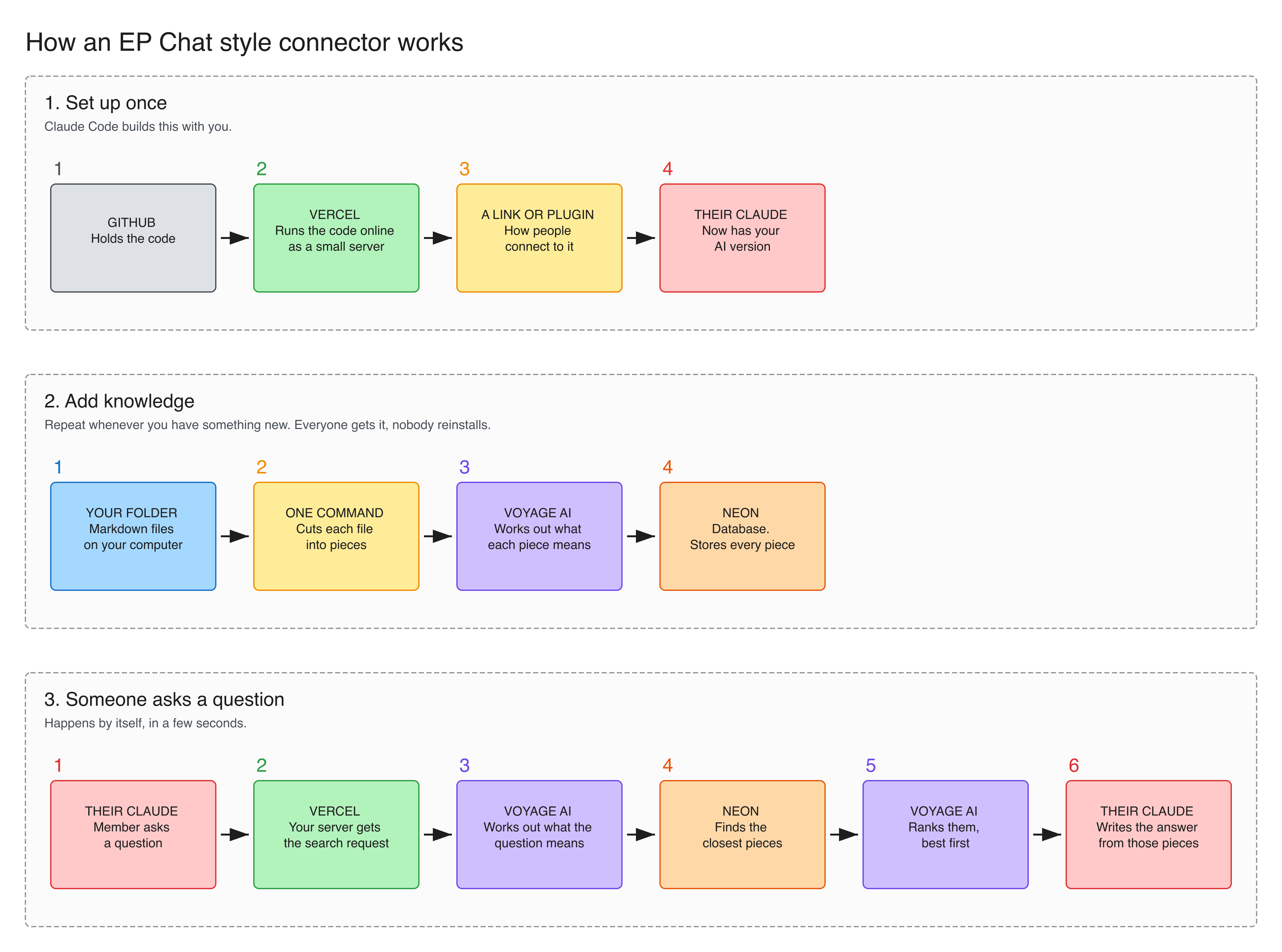
This is the way I rebuilt EP Chat before I found Chat Thing. I built it out of desperation. It works as a connector that plugs straight into Claude and pulls my persona and knowledge from my own database.
This gave two big benefits.
- No API cost to me, except hosting a server for pennies. Their own Claude plan does the thinking.
- People love it. Before, they had to copy and paste into the custom GPT. Now they hook up the EP Chat connector in their chosen AI tool, and at any point while they're working they can ask EP Chat for help.
Four apps connect together. GitHub holds the code. Vercel runs it, so it's live when someone needs it. Neon is the database that holds your knowledge. Voyage AI is the search brain that finds the right passage.
Pros: you own all of it, and nobody can switch it off on you.
Cons: the most setup by a mile, and you're maintaining your own servers.
Best for: people happy to get in the weeds and Claude Code their way to victory.
Which Custom GPT Alternative Should You Choose?
My default, if you want one. A GPT that's just for you or your team: migrate it to a ChatGPT plugin. Anything customer-facing: Chat Thing. A paid community or client base where your material is the product: your own connector.
Whichever you pick, save what's inside your GPT first. Copy the instructions, gather the knowledge files, and write down five prompts you use all the time, with a good answer to each. That's how you test the replacement.
Custom GPT Retirement FAQ
When do custom GPTs stop working?
On 11 December 2026, on all ChatGPT plans. FedRAMP workspaces and Enterprise workspaces with an approved deferral have until 11 February 2027. Check the notice in your own account.
Will I lose my old custom GPT conversations?
No. OpenAI says your existing conversations stay in your chat history after retirement. They can't be moved into a project.
What transfers when I migrate a custom GPT to a plugin?
Your instructions become a skill, your knowledge files become reference files, and connected apps come across. Custom actions, the model you picked and your sharing settings don't. Migration uses the latest published version, so publish any edits first.
Can I still share my GPT with a link after migrating?
Not the way you could before. A migrated plugin starts private, and nobody who used your GPT gets access automatically. Making it public means submitting it to OpenAI's plugin directory.
What if I only use someone else's custom GPT?
You can't migrate it yourself. Ask whoever made it what's replacing it.
If you've got custom GPTs, try the plugin migration on one so you understand it. If it doesn't fit, Chat Thing is where I'd go next.
Just don't leave it until December 10.
The full step-by-step setup videos for all 3 routes are inside my community. See what's inside my AI community, Half Day Thursdays: halfdaythursdays.com
I test AI on my own business and send what works every week, with the full prompts. You can join below.