Claude for business · Eliot Prince
Claude for Google Docs and Sheets Tested (Slides Failed)
I tested Claude for Google Workspace on launch day. My own skill worked inside Google Docs, Sheets started auditing a workbook, and Slides refused every action.
I opened a messy Google Doc, a brain dump about my ten commandments of AI, full of spelling mistakes with a bit of voice transcript thrown in. Then I asked Claude, sitting in the sidebar, to tidy it up using my own voice copywriting skill. It pulled the skill straight from my Claude account and came back with a stack of rewrites I could accept or reject one by one. That was Claude in Google Docs, less than an hour after it launched.
Docs worked. Sheets looked good. Slides refused every action. I recorded this test on launch day and the video went out on 6 October 2026. It's a beta, so some of what follows may have changed since.

What Is Claude for Google Workspace?
Claude for Google Workspace is an add-on that puts Claude in a sidebar next to your Google Docs, Sheets and Slides files, where it reads what you have open and edits in place. You approve each edit before it lands. Your connectors, skills and enterprise controls come with you. This is awesome.
For a while we've had Claude inside Microsoft Word and Excel. A lot of us use Google Docs and Google Sheets though, and it's been frustrating not to have Claude working directly in there. At launch it was in beta on all paid plans. Anthropic's help article lists Pro, Max, Ultra, Team and Enterprise.
Docs vs Sheets vs Slides: What Worked on Launch Day?
Docs did the most, Sheets got going, and Slides never built anything. Here's how each one went in my test.
| Where | What I asked | What happened |
|---|---|---|
| Google Docs | Tidy a brain dump using my voice copywriting skill, then fix the numbering | Loaded my skill, gave suggestions to accept or reject, fixed the numbering with a script once I allowed it |
| Google Docs + Circle connector | Post the Doc as a draft in my community | Worked. The draft post landed in the playbooks area |
| Google Sheets | Audit a profit and loss workbook for formula errors | Read the sheets and ran code. Seemed to be working nicely |
| Google Slides | Turn the Doc into a branded slideshow | Read the Doc and my brand skill, then refused every action with "Action not allowed" |
| Claude chat on the web, Doc link pasted in | Work on the Doc together | Asked me to connect the new Google Docs connector. Edits land in the same Doc, no side-by-side panel |
| Claude Cowork, Doc link pasted in | Work on the Doc together | Nothing special. It read it and that was it |
How Do You Install Claude in Google Docs?
You install it from the Google Workspace Marketplace, then open it from the Extensions menu inside a Doc. The Claude listing gives you two buttons. Admin install puts it across your whole workspace, and Individual install is there if you don't have a full Workspace account. I went with the admin install.
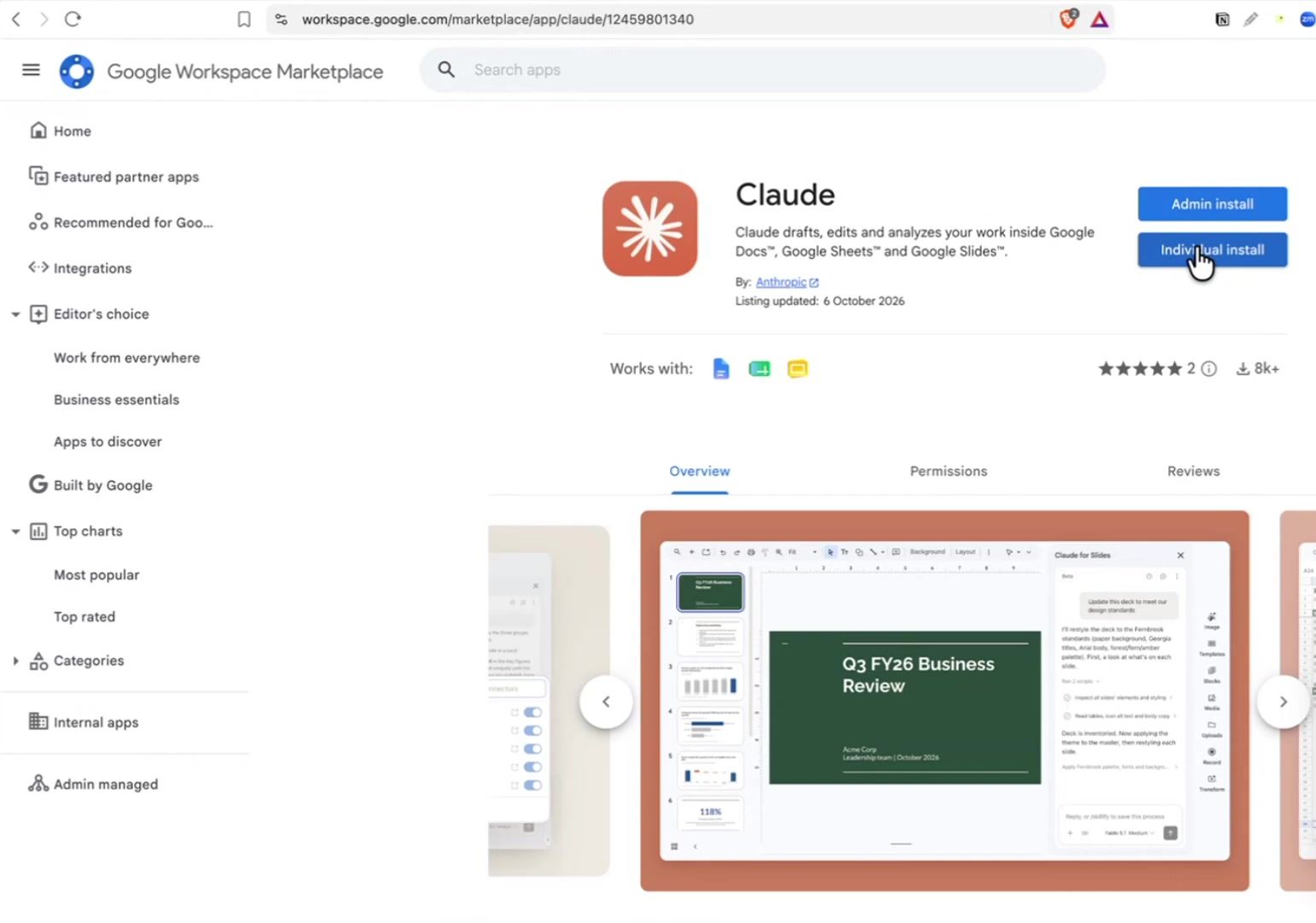
Then open a Google Doc and go to Extensions, then Claude, then Open Claude. Boom, Claude for Docs is running on the right-hand side. You link your Claude account and it walks you through a few screens. Ways to work with Claude (redline contracts, fix formatting, questionnaires and forms), then "What's your role?". You'd think it would know all of that, seeing as I'd linked my Claude account.
The next screen connects your work tools, so it can pull in files, messages and records from Gmail, Notion and the rest. I used to do a lot of SEO reporting and I'd want those reports in Google Docs to send to clients. This would let me hook all of that up together.
You also get a warning that the feature is in beta, and that files, emails and attachments can contain hidden instructions to try and direct Claude. That's a prompt injection attack, where people hide prompts inside things they send you. So be very careful about what documents you use with it. Make sure it's something you've created or it's from a source you trust.
Can Claude Use Your Own Skills in Google Docs?
Yes. In my test it pulled my voice copywriting skill straight from my main Claude account. The sidebar offers simple starters like checking for inconsistencies, but I wanted to go deeper and see if my skills came across. So I asked:
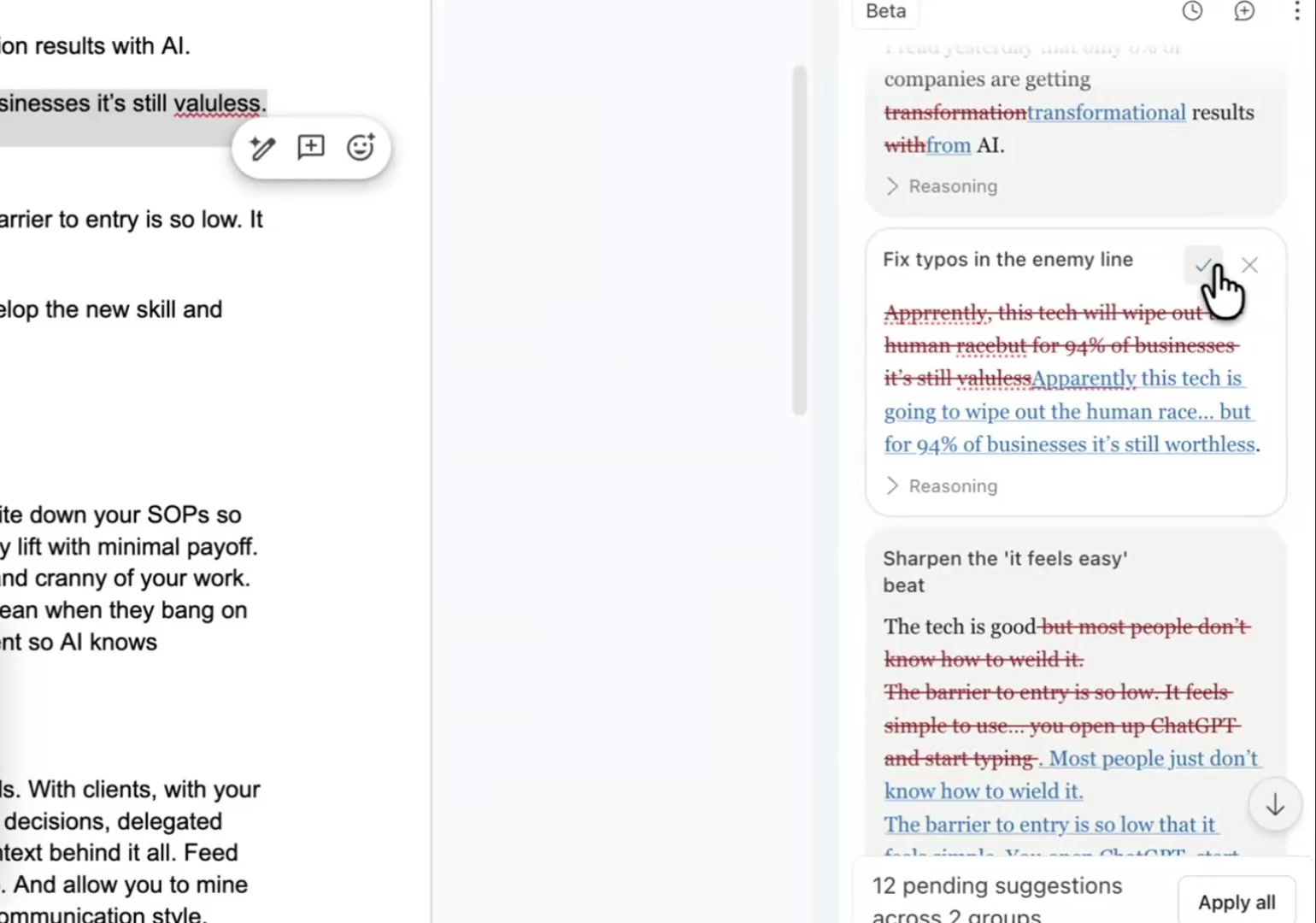
Hey, can you bring this piece to life and tidy it up? It's just a brain dump mess. Can we use my skill to bring the top five points nicely written, please?Interestingly, it doesn't apply the rewrites straight to the Doc. It lists them in the sidebar and you click into each one. You can see the reasoning behind every change, then tick it, reject it and put the original back, or hit Apply all.
It's almost like working with a human editor who adds suggestions. You can work section by section, or apply the lot. When I applied them, it fixed all the errors, gave the piece nice formatting and used my voice skill to rewrite some of it.
When It Got the Numbering Wrong
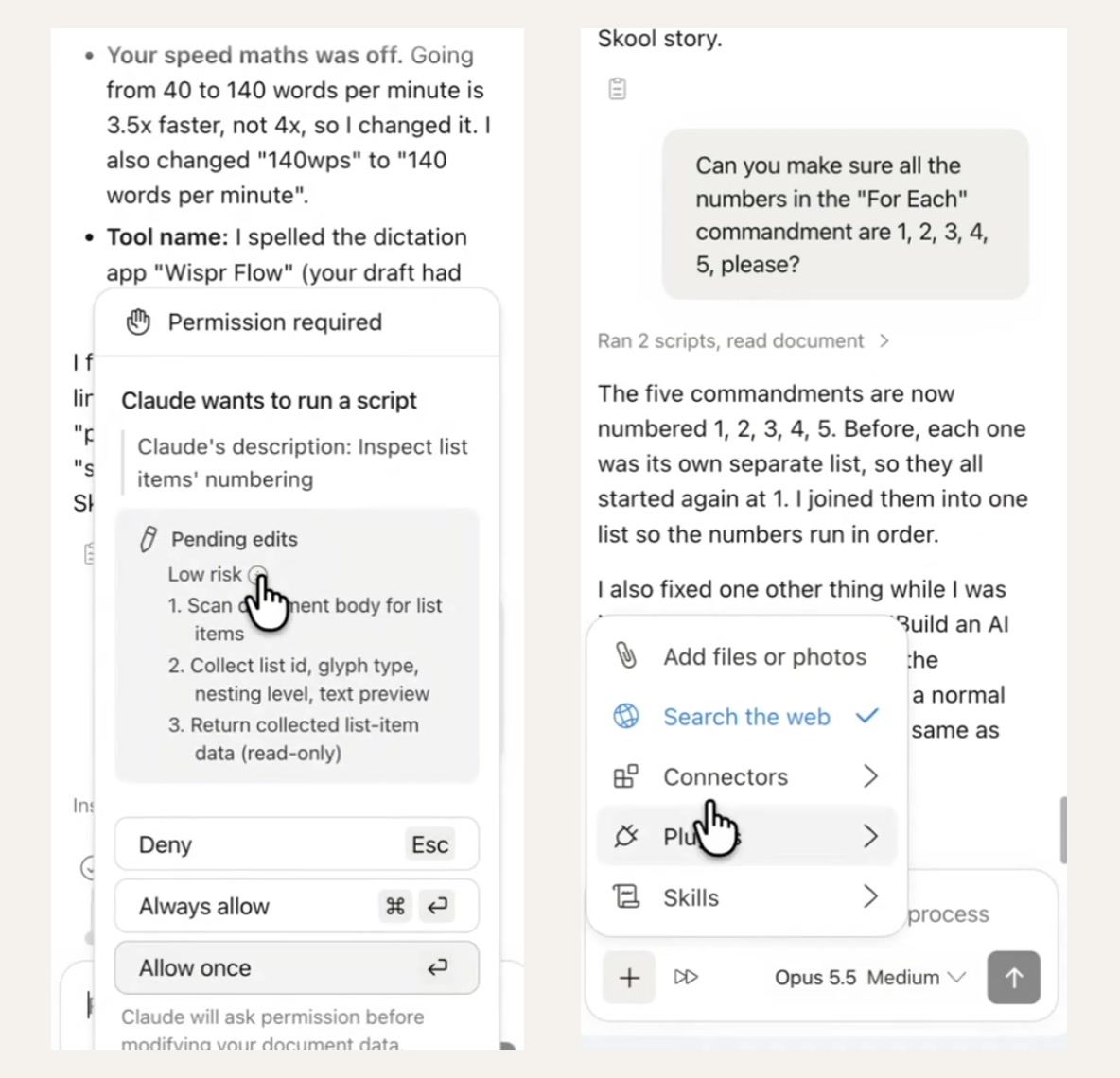
It didn't do a perfect job. Every commandment came out numbered 1, so I asked it to fix that:
Can you make sure all the numbers in each commandment are 1, 2, 3, 4, 5, please?Then it asked me for permission to run a script. It said the script was low risk and only read the document content and list item data. So instead of me doing find and replace, it goes and finds those numbers itself. I clicked allow, and the five commandments came back numbered 1 to 5.
That's it running code rather than running AI models to do the work, which is going to be a lot cheaper and probably a lot faster.
What Else Is in the Claude for Docs Sidebar?
The box at the bottom says "Reply, or /skillify to save this process". So if you've worked through a process with it, you can type /skillify and save it as a skill. There's an accept all edits option, and the plus button lets you pick skills, connectors and plugins, or switch on web search. You can choose your model in there too.
The web search is the one I'd have loved when writing content. If you're a copywriter and an editor sends you an outline, you can get Claude to go and do the research right there in the Doc.
Claude for Google Sheets: Auditing a Profit and Loss Pack
Claude for Google Sheets works the same way, from Extensions, then Claude. I opened an accounting pack, a monthly profit and loss for a revenue tracking app, and straight away it offered me some built-in skills. I picked the audit one:
/audit-xls audit this [sheet or workbook] - fix any formula errors, broken references, or formatting errorsThat's Claude's built-in audit prompt.
It started reading every sheet and running code, the same script approach as in Docs. I left it to it while I tested other things, and when I checked back the Sheets side seemed to be running nicely. The Claude for Excel plugin is super powerful, so I'm assuming this brings the same power, with all our skills, into Sheets.
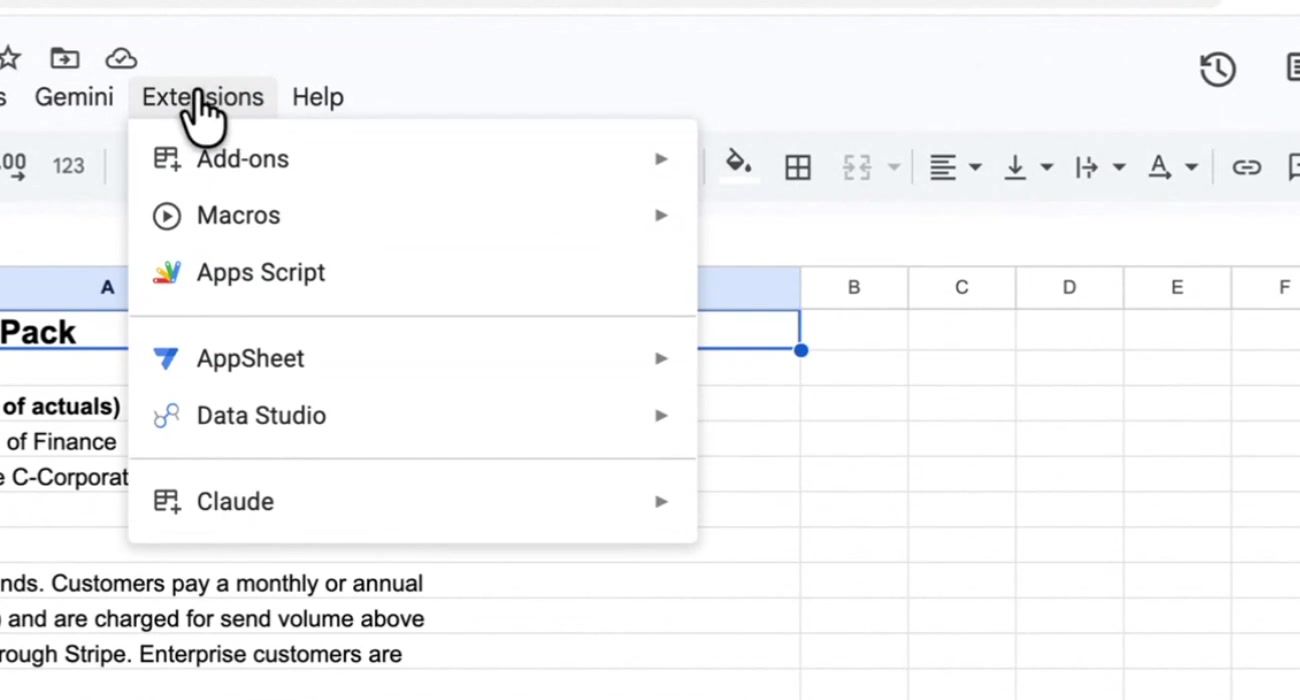
Why Can't I See Claude in the Extensions Menu?
It might be because the file isn't a native Google file. If you uploaded it as an .xlsx or a Word doc, the Extensions menu won't show up for Claude. Go to File and save it as a Google Sheet or Google Doc first, then the Extensions menu appears and you can open Claude. Anthropic's help article says the same: Google doesn't support extensions in Word, Excel or PowerPoint files.
Pushing a Google Doc Into My Community With a Connector
Next I wanted to see if a connector would work from inside the Doc. I asked:
Can you take this doc and put it as a draft post in the playbooks area of my Circle community, please?And it did it. Hallelujah. The post was sitting there as a draft in my community. Being able to write in Google Docs and push it straight in there is super helpful, rather than having to switch over to Gemini, which doesn't have all of my skills and connectors.
This is a massive step up. Before this I was telling people maybe stick with Word docs or spreadsheets for a while, because Claude works so well in there. Now we don't have to worry about that. See what's inside my AI community, Half Day Thursdays: halfdaythursdays.com
Claude for Google Slides: Why It Failed
Claude for Google Slides didn't build anything in my test. First, Claude didn't show up in Slides straight away. Then it appeared. You might have to install it separately if it doesn't pop up. (Anthropic's help article says one install covers Docs, Sheets and Slides.) Then I asked:
Can you turn this Google Doc into a branded slideshow? Use my Half Day Thursdays brand print.It ran my skill and read the Doc. Then it reported that Google Slides was refusing every action on the presentation with an "Action not allowed" error, including just reading it. So that was unfortunate. I'm sure that's a glitch, or I've maybe done something wrong.
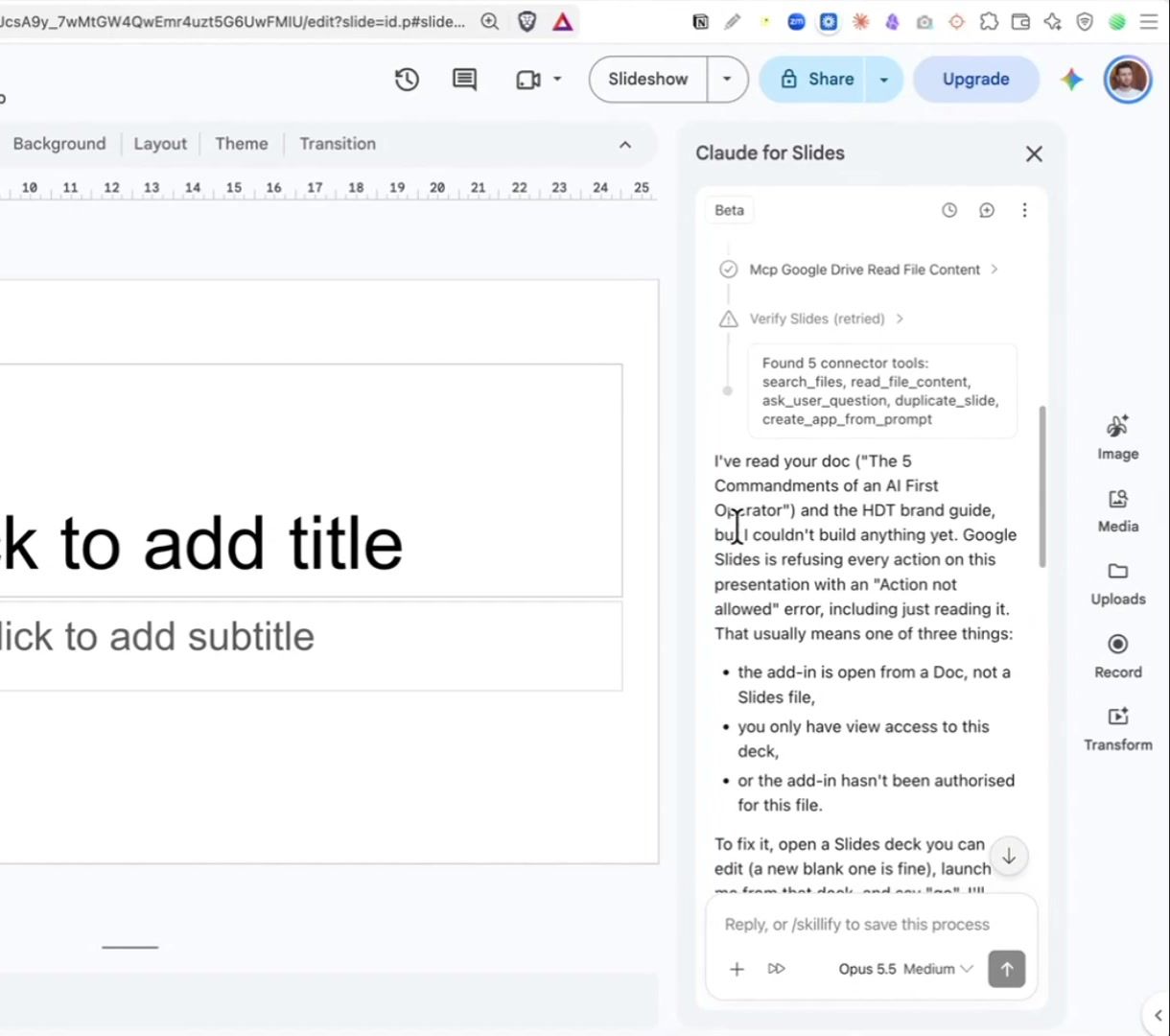
Funny thing while I was testing. It had been out for less than an hour and there was already a new version of the add-on asking me to refresh. They were already pushing updates to their brand new update.
Can You Paste a Google Doc Link Into Claude?
Yes, but in my test it only did something useful in chat mode. The announcement said you could paste a Google file link into Claude and work on it side by side. I tried it in Cowork mode on the desktop and it didn't do anything special. It just looked at the Doc. Cowork in the web browser didn't do much either.
In chat mode on the web it asked if I wanted to connect the Google Docs connector, which is new. Before, there was just a Google Drive connector, not a specific Google Docs one. I hooked it up and it said edits would now land straight in my Doc with the same link. I was expecting a side-by-side panel. It doesn't do that.
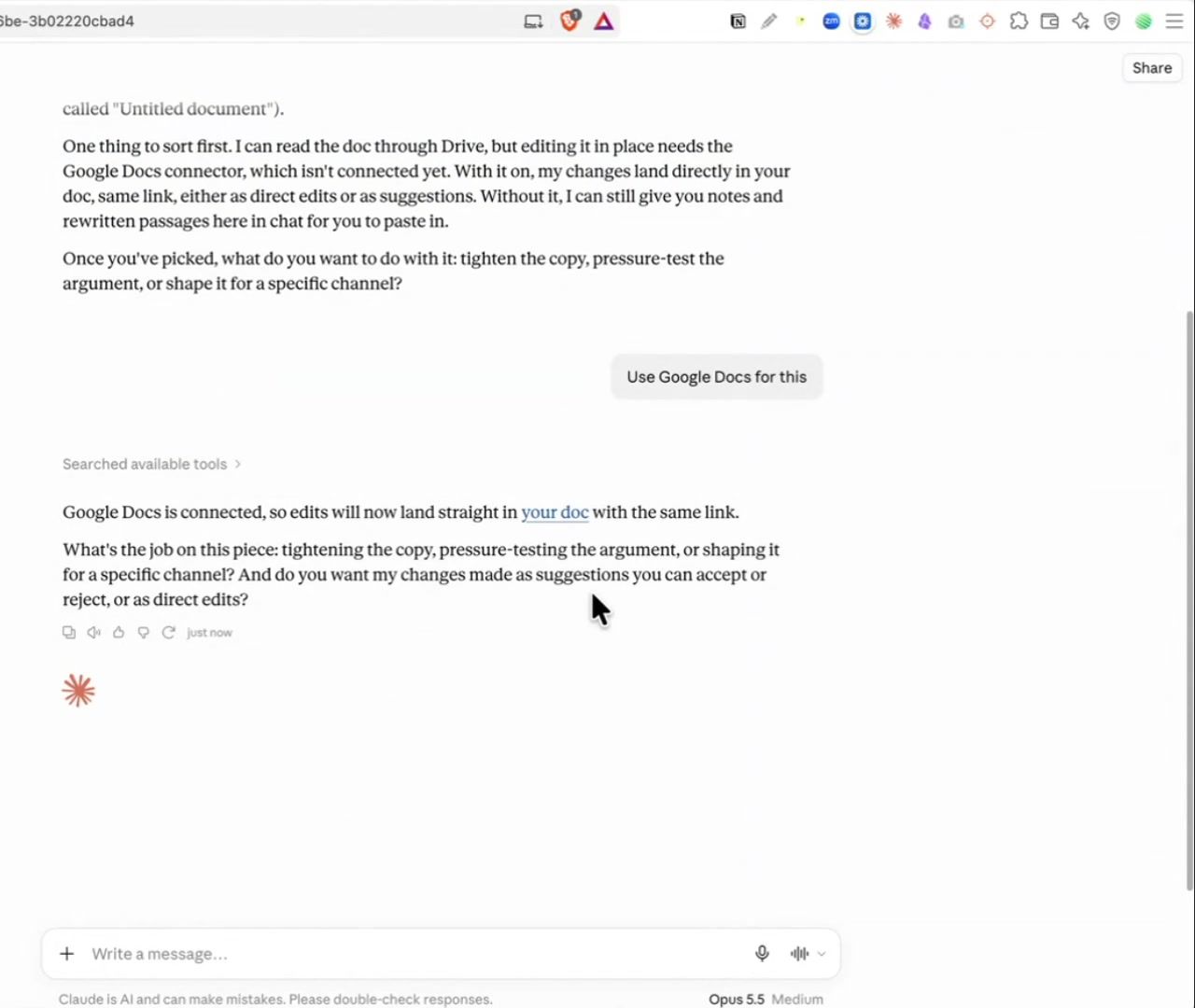
Before this, I don't believe Claude could edit existing Google Docs and spreadsheets directly. It had to create new ones, or it wasn't very good at it. And if you go into your connectors and type in Google, there's now a Google Sheets connector and a Google Slides connector you can hook up too.
FAQ
Is Claude for Google Workspace free?
No. At launch it was in beta on all paid plans, and Anthropic's help article lists Pro, Max, Ultra, Team and Enterprise.
Does Claude edit my Google Doc without asking?
Not in my test. It showed each rewrite as a suggestion I could accept or reject, and it asked permission before running a script. There's also an accept all edits option if you want to move faster.
Why doesn't Claude show up under Extensions?
It might be because the file is an uploaded .xlsx or Word file. Save it as a Google Sheet or Google Doc from the File menu and the option appears.
Can Claude use my skills and connectors inside Google Docs?
Yes. In my test it used my voice copywriting skill and my Circle connector from inside the Doc.
Do I need a separate install for Google Slides?
You might. Claude didn't appear in Slides straight away for me, then it did. You might have to install it separately if it doesn't pop up. Anthropic's help article says one install covers all three apps, so check the Extensions menu in Slides before installing again.
Is it safe to use Claude on any Google Doc?
Be careful. The beta warns that files, emails and attachments can hide instructions aimed at Claude. Stick to documents you created or ones from a source you trust.
Overall, super impressive. We can now use Claude across the Google suite, in Docs, in Sheets, and in Slides as well once I get that working.
I test AI on my own business and send what works every week, with the full prompts. You can join below.